
Robokiller - Spam Call Blocker
Mosaic SrlCommunication
3.851.62K Reviews
- Version
- 24.7.7
- Installs
- 5.00M
- Age Rating
- Everyone
Screenshots

Our Review of Robokiller - Spam Call Blocker
 Analysis by Appyee
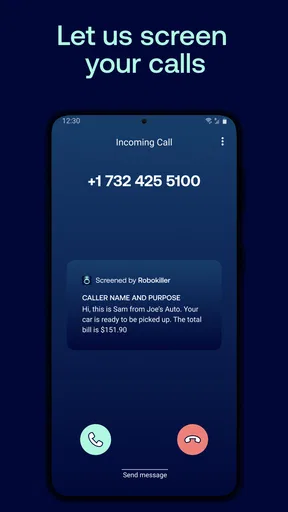
Spam filtering only earns a place on my phone if it makes ordinary days calmer without making important calls harder to catch. Robokiller - Spam Call Blocker is built for that trade-off: it focuses on screening unwanted calls and texts, while giving you tools to review what happened. I’d approach it as a call-management app to configure and check, not as a switch that can be turned on once and forgotten.
A sensible first routine for incoming calls
My practical starting point is to install the app, work through its setup, and then pay attention to the first few screened calls. A call that does not ring can be a welcome interruption avoided, but an unfamiliar number can also belong to a delivery driver, clinic, school, or someone returning a call. The blocked-call log matters for that reason: checking it occasionally helps me judge whether the screening is matching my expectations.
For an everyday example, imagine I’m expecting a call about a repair appointment while also getting nuisance calls from unknown numbers. I would keep the app’s screening in mind, check the log after the expected call window, and return a legitimate missed call if needed. That small habit is more useful than assuming every unknown number is safe to suppress. It also gives me a way to notice if the balance between quiet and reachability needs adjusting.
Settings to review before relying on it
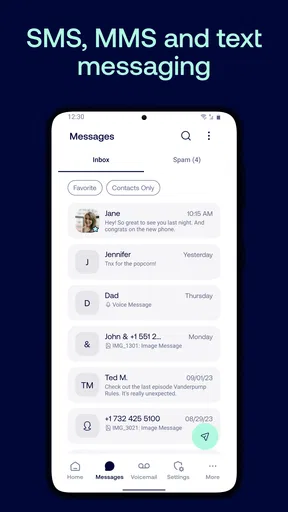
Call and text filtering depends on how the app is set up on the phone, so I would read each setup prompt instead of tapping through automatically. In particular, I’d make sure I understand which app is handling messages before changing the default SMS choice. Robokiller’s store summary points to using it as the default SMS app, but that is a meaningful change: if I prefer another texting app’s layout or habits, I should decide whether the spam-screening benefit is worth switching.
I’d also make a point of reviewing any available blocking and notification choices rather than treating the strongest-sounding option as automatically best. A person who receives calls from new clients may want a more cautious routine than someone whose calls mostly come from saved contacts. The key is to test the experience against the calls I actually need, then revisit the log if something seems to be missing. I would not assume that a spam filter can identify every unwanted call perfectly.
Use the extra tools without making them the main reason
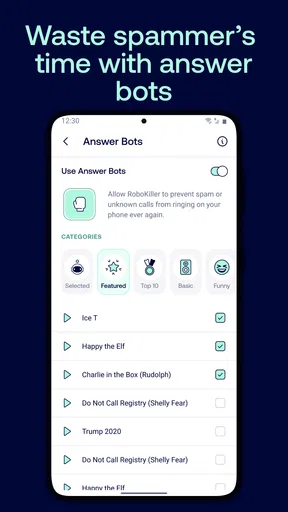
The Answer Bots add a more playful side to call screening, but I see them as optional. For someone who enjoys the idea of a recorded response, they can make nuisance calls less irritating; for someone who wants a quiet, straightforward phone, the basic blocking purpose is more important. I’d try a preset before making a personal recording, and keep in mind that turning a spam call into a joke is not the same as preventing every unwanted contact.
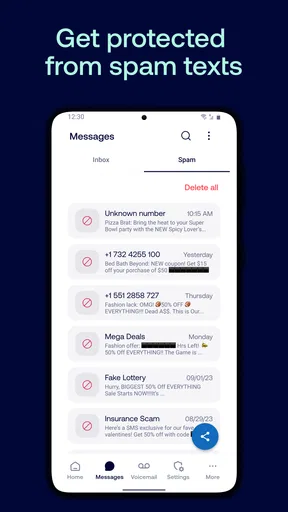
Texts deserve their own check, too. If messages are part of the problem, using a filtering app as the default SMS handler can make the setup more cohesive, but it also means adapting to a different messaging workflow. I’d compare that change with the built-in spam controls in my current messaging app before moving everything over. If calls are the only nuisance, changing text habits may be unnecessary.
How Robokiller Works Its Magic
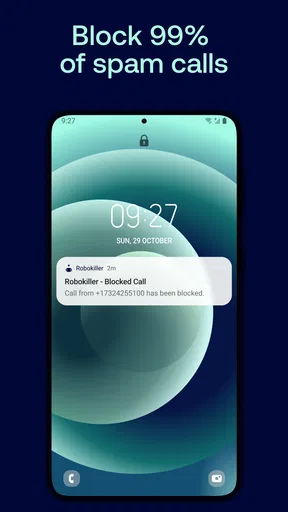
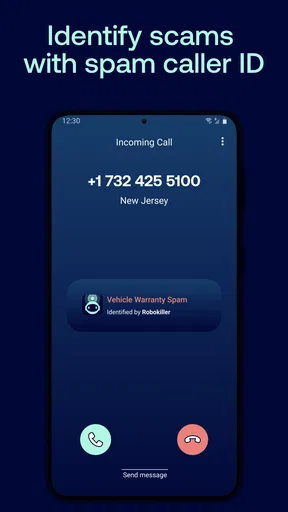
At its core, Robokiller is designed to automatically block spam and robocalls, and trust me, it does this exceptionally well. The app uses a massive database of known spam numbers, which it updates regularly to ensure it’s always one step ahead of those pesky callers. Once you install it, the app starts screening your calls. When a spam call is detected, Robokiller intercepts it, so your phone doesn’t even ring. It's like having a personal bodyguard for your phone!
The Features That Stand Out
What really caught my attention were some of the standout features of Robokiller. First, there's the Answer Bots. These are pre-recorded messages that respond to spam calls, often confusing the callers and wasting their time. You can choose from a variety of hilarious recordings or even create your own. It's a bit of fun and a little bit of sweet revenge!
Another feature I love is the app's ability to block texts from known spam numbers. It's like a double shield, protecting both your calls and texts from unwanted intrusions. This makes it incredibly comprehensive in keeping your phone spam-free.
Setting Up Robokiller
Getting started with Robokiller is a breeze. After downloading the app from the App Store or Google Play, it guides you through a simple setup process. You'll need to enable some permissions to allow the app to monitor your calls, but the interface is user-friendly, making it easy even for those who aren't tech-savvy.
Once set up, it works quietly in the background, letting you live your life without interruptions. The app also provides a detailed log of blocked calls, so you can see exactly who’s been trying to reach you and feel satisfied knowing they couldn't get through.
My Personal Experience
Since installing Robokiller, I've noticed a significant drop in the number of spam calls. My phone used to ring multiple times a day with unknown numbers, but now, it's blissfully silent. The peace of mind knowing that I won't be disturbed during meetings or while I'm relaxing has been invaluable.
Plus, the Answer Bots have provided endless entertainment. I even set up a bot with my own recording to mess with the spam callers, and listening back to those interactions can be surprisingly fun.
Worth Every Penny?
Now, let's talk about the cost. Robokiller isn't free, but I find the subscription fee to be reasonable given the level of protection and peace it provides. There’s a free trial period, so you can test it out and see if it fits your needs without any risk.
For anyone who’s been plagued by spam calls, I’d say it’s absolutely worth it. The time and annoyance it saves are well worth the price for me.
Where it fits among phone-filtering options
Robokiller is a communication app from Mosaic Srl, and its main appeal is that it brings call screening, spam-text blocking, and playful Answer Bots together. The familiar alternative is to rely on a phone’s built-in caller controls or the spam tools already included with a messaging app. Those can be enough if unwanted calls are occasional and I only need basic blocking. Robokiller makes more sense when repeated nuisance calls are disrupting the day and I want a dedicated place to review blocked activity.
That does not mean I would replace every existing phone setting automatically. Built-in controls may feel simpler and require less adjustment, while a dedicated filter offers a more focused workflow. I’d compare them over a normal week: note whether the phone still rings for unwanted callers, whether important unfamiliar numbers remain easy to catch, and whether the separate SMS setup is comfortable. The better choice is the one that reduces interruptions without creating new missed-call anxiety.
Fast habits that make screening easier to trust
For a smoother routine, I’d check the blocked-call log at a predictable time rather than reacting to every unknown number as it appears. A quick review after work or after a day of appointments can catch a legitimate caller without turning call screening into another constant task. If I’m expecting an important call from a number I don’t know, I’d be more attentive to the log during that period and avoid assuming silence means the caller never tried.
I’d also keep the SMS decision separate from the call decision. If I switch Robokiller into the default messaging role, I’d first make sure I’m comfortable finding everyday conversations there. If that change feels cumbersome, I can prioritize call screening and reconsider the text workflow rather than forcing both into one routine. This is a useful trade-off for people who like their current texting app and do not want spam protection to disrupt familiar habits.
Answer Bots are best treated as an extra, not as a required step in getting value from the app. I’d choose a response that feels appropriate and leave the feature alone if I prefer a no-fuss filter. A personal recording may be amusing, but it also takes more thought than simply using a preset; the practical benefit is the screening, while the entertainment is a bonus. That distinction helps keep expectations realistic.
Who should consider it, and who may prefer simpler controls
I can see this being useful for people who regularly receive unsolicited calls, anyone whose workday is interrupted by unknown numbers, and households that want a more deliberate way to handle spam texts as well as calls. It is also a reasonable fit for someone who enjoys reviewing a log and tuning a repeatable routine instead of manually declining each nuisance call. The audience is broad: the app is rated for Everyone, and it is free to install, though in-app purchases range from $0.99 to $129.99 per item.
I’d be more cautious if I depend on calls from new numbers throughout the day, such as a person arranging services, taking job calls, or coordinating deliveries. Screening can reduce noise, but the value of quiet has to be weighed against the possibility of needing to inspect missed activity. Someone who rarely gets spam may also find the phone’s existing call and message controls sufficient, with less setup and no change to their default texting routine.
It’s worth knowing the scale and maturity of the product without treating popularity as a guarantee for an individual phone. Robokiller has an average rating of 3.9 from around 124,000 ratings, and it has been installed over 5 million times. That gives me a sense that many people have tried it, but my own decision would still come down to the quality of screening in my routine and whether I’m happy with the app’s role in calls and messages.
Compatibility, cost, and practical expectations
The current version is 24.7.7, and the Android requirement is version 10 or later. I’d check compatibility before building a daily routine around it, especially on an older phone. Although the app is free, paid in-app items are available, so I would review the purchase choices in the app and decide what I actually need rather than assuming every useful part is included at no cost. The app’s value depends on the protection and workflow I get, not on buying extras by default.
One question I would ask before installing is whether I need spam protection for calls, texts, or both. If calls are the main problem, I can focus my evaluation there first. If text filtering matters too, I should be ready to consider the default SMS change and judge whether it suits my normal conversations. Another practical question is how often to check blocked activity: I’d start with occasional reviews, then make them more frequent if I’m expecting an unfamiliar caller or notice a missed contact.
I would not promise myself a completely interruption-free phone. The point of a filter is to reduce unwanted contact, not to make every unknown number harmless or every legitimate caller instantly recognizable. Staying aware of the log and keeping my own expectations measured is part of using it well. That modest oversight is the price of getting more quiet without blindly trusting any automated screening tool.
My Personal Experience
Since installing Robokiller, I've noticed a significant drop in the number of spam calls. My phone used to ring multiple times a day with unknown numbers, but now, it's blissfully silent. The peace of mind knowing that I won't be disturbed during meetings or while I'm relaxing has been invaluable.
Plus, the Answer Bots have provided endless entertainment. I even set up a bot with my own recording to mess with the spam callers, and listening back to those interactions can be surprisingly fun.
Worth Every Penny?
Now, let's talk about the cost. Robokiller isn't free, but I find the subscription fee to be reasonable given the level of protection and peace it provides. There’s a free trial period, so you can test it out and see if it fits your needs without any risk.
For anyone who’s been plagued by spam calls, I’d say it’s absolutely worth it. The time and annoyance it saves are well worth the price for me.
In conclusion, if you're tired of spam calls interrupting your day, Robokiller is definitely worth a try. It's effective, entertaining, and most importantly, it gives you back control of your phone. So, go ahead, give it a shot, and enjoy a spam-free life!
Verdict
Strengths of Robokiller - Spam Call Blocker
- Effectively blocks spam calls.
- Customizable settings for users.
- Easy to navigate interface.
- Includes a call screening feature.
- Reduces unwanted distractions.
Limitations of Robokiller - Spam Call Blocker
- May miss some spam calls.
- Subscription cost can be high.
- Occasional false positives.
- Requires constant updates.
- Limited free trial features.
Other Releases by Mosaic Srl
View All
Weather Live°
Weather4.4

Clime: NOAA Weather Radar Live
Weather4.2

Blossom - Plant Identifier
Education4.4

Planes Live - Flight Tracker
Travel & Local4.0
Similar Picks in This Category
View All
Google Messages
Google LLC4.6

Gmail
Google LLC4.1

Google Meet
Google LLC4.4

Google Chrome
Google LLC4.1

WhatsApp Messenger
WhatsApp LLC4.6

Carrier Services
Google LLC4.2
Frequently Asked Questions
How does Robokiller identify spam calls?
Robokiller uses a combination of advanced algorithms and a global database of known spam numbers to identify and block spam calls. The app analyzes call patterns and caller behavior to determine the likelihood of a call being spam, ensuring that legitimate calls are not mistakenly blocked.
Will Robokiller block important calls by mistake?
While Robokiller is designed to minimize false positives, no system is perfect. The app allows users to customize their block lists and manually whitelist important contacts to ensure that critical calls are not missed. Regular updates also help improve accuracy over time.
Does Robokiller work internationally?
Robokiller primarily focuses on spam calls in the United States and some other regions. However, its effectiveness may vary internationally due to differences in call patterns and spam behavior. Users outside supported regions might experience limited functionality.
Is Robokiller compatible with all phone carriers?
Robokiller is compatible with most major phone carriers, including AT&T, Verizon, T-Mobile, and Sprint. However, some smaller or regional carriers might not fully support all features. It’s advisable to check compatibility with your specific carrier before downloading.
What happens to blocked calls with Robokiller?
Blocked calls are redirected to Robokiller's Answer Bots, which simulate a conversation to waste the spammer's time. Users can listen to these interactions later. Additionally, the app logs all blocked calls, allowing users to review and adjust settings if necessary.
